We use cookies to make your experience better. To comply with the new e-Privacy directive, we need to ask for your consent to set the cookies. Learn more.



Industrial Automation

Filter
Shopping Options
Filters
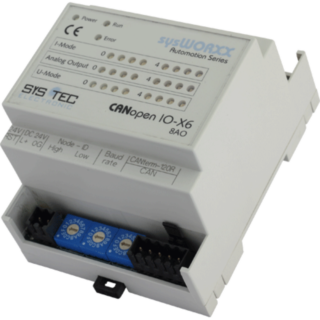
 SYS TEC CANopen IO-X6, 8AOCompact & cost efficient analogue CANopen I/O moduleExtensive diagnostic functions ensure reliable and safe operation
- SYS TEC CANopen Manager Source Code CiA 302Combinazione del master NMT con funzioni aggiuntive Implementazione standardizzata dei processi
- SYS TEC SDO Gateway Add-onThe SDO Gateway Add-on implements a SDO gateway function, which makes possible the SDO transfer between two or more CANopen networks. To use this feature, the gateway device must feature at least two CANopen instances.
- SYS TEC CiA 304 SRDO Add-onThe CiA 304 SRDO Add-on provides all services and functionality compliant to CiA 304 V1.0 - CANopen Framework for safety relevant communication.
- SYS TEC CANopen CiA 402 Add-onCANopen per azionamenti e motion control secondo CiA 402 Le applicazioni CANopen per azionamenti e motion control conformi alla specifica CiA 402 consentono il controllo di prodotti digitali per l’azionamento, come servoazionamenti, convertitori di frequenza e servomotori. L’Add-on CANopen CiA 402 per il CANopen Stack include le routine software necessarie per implementare applicazioni CANopen per azionamenti e motion control secondo CiA 402. È utilizzato, tra gli altri, per prodotti di…
- SYS TEC Dynamic OD Add-onThe Dynamic OD Add-on implements a Dynamic Object Dictionary as specified in CiA 302 and provides functionality to replace, extend or modify parts of an existing object dictionary at runtime (e.g. PDOs, process data). It uses a special kind of compressed binary DCF, called "Concise configuration storage".
- SYS TEC MPDO ADD-ONMultiplex PDO services CANopen Add On according to CiA 301 The MPDO add-on module provides multiplex PDO services according to CiA 301. A multiplex PDO is a special PDO which is used where more process data has to be transferred than "normal" PDOs are able to transfer. MPDO's are used for example with CANopen lifts (CiA 417). To use the Add-On Module the CANopen Master Slave Stack or CANopen Manager Stack is required.
- SYS TEC CANOPEN FLYING MASTER ADD-ONThe extension module Flying Master renders a CANopen Manager according to CiA-Standard 302 Part 2 with the possibility to determine the NMT mode as Master or Slave dynamically to the run time.
- SYS TEC CANopen Device Explorer Full VersionInspection & advanced configuration of CANopen devices CANopen DeviceExplorer is a versatile tool for development, testing, diagnostics and service tasks. The integrated CANopen master functionality allows the inspection and configuration of CANopen devices through direct access to the Object Dictionary (OD) . The necessary information about the respective device is read from the electronic data sheet of the device (EDS or XDD format) or queried directly from the…
- SYS TEC CANopen BootloaderTransfer programs in binary format Functionality according to CANopen-Standard CiA 302 The CANopen Bootloader is a software package that is used to transfer programs in binary format to the target hardware via CANopen and to execute them there. The functionality is based on the specifications made in the CANopen standard CiA 302. To use the Add-On Module the CANopen Master Slave Stack or CANopen Manager Stack is required.